How to Sit at a Desk

Darius
| 22-10-2026
 · News team
Spending long periods at a desk can place sustained demands on the muscles and joints.
A well-adjusted workstation can support comfortable sitting and help reduce unnecessary physical strain during computer-based work.
Good ergonomics does not mean maintaining one rigid posture. The aim is to create a balanced setup that supports the body while allowing natural movement and regular changes in position.
Adjust Your Chair
Set the chair height so both feet can rest securely on the floor and the hips remain approximately level with or slightly higher than the knees.
Use the backrest to support the back comfortably. If lumbar support is adjustable, position it to follow the natural curve of the lower back without pushing the torso forward.
If your feet cannot reach the floor after adjusting the chair, use a stable footrest.
Align Your Body
Keep the head balanced over the shoulders and allow the spine to maintain its natural curves. Avoid excessive slouching, leaning forward, or deliberately forcing the back into a rigid position.
Keep the shoulders relaxed and the elbows comfortably close to the body. The goal is a supported position that does not require unnecessary muscular effort.
Position the Screen
Place the monitor directly in front of you to limit unnecessary head and neck rotation. Adjust its height so you can view the display comfortably without consistently bending the neck or pushing the head forward.
The eyes should naturally look slightly downward toward the screen. Adjust the viewing distance and text size so that reading does not require leaning closer.

Set Up the Keyboard and Mouse
Keep the keyboard and mouse within easy reach so the shoulders remain relaxed and the elbows stay near the sides of the body.
Position the forearms comfortably at approximately the level of the work surface. Keep the wrists as close to neutral as possible rather than continuously bending them upward, downward, or sideways.
Move Regularly
Even a well-arranged workstation cannot replace regular movement. Staying in one position for extended periods can contribute to stiffness and muscular fatigue.
“studies have shown that taking short breaks every hour helps reduce discomfort for those who work on computers.” — NIOSH/CDC, Office Environments and Your Safety.
Stand, walk briefly, or change your working position throughout the day. Movement should be treated as a routine part of desk work rather than something reserved for when discomfort appears.
Avoid Common Errors
Watch for habits that can make desk work less comfortable:
- Slouching deeply into the chair
- Leaning toward the monitor
- Holding the head forward for extended periods
- Raising the shoulders while typing
- Placing the keyboard or mouse too far away
- Leaving the feet unsupported
- Remaining in one position for too long
Correcting these issues can improve the overall arrangement of the workstation.
Personalize Your Setup
There is no single configuration suitable for everyone. Body proportions, furniture, equipment, and individual comfort all influence the ideal arrangement.
Adjust the workstation so that essential equipment can be used without excessive reaching, twisting, or forward leaning. A flexible setup is more practical than trying to maintain one fixed posture or measurement.
Know When to Seek Medical Advice
Persistent, worsening, or severe discomfort should not automatically be attributed to desk posture. If symptoms continue despite reasonable workstation adjustments or interfere with normal activities, seek appropriate professional medical assessment.
Particular attention is warranted when discomfort occurs with significant weakness, numbness, or other unusual symptoms.
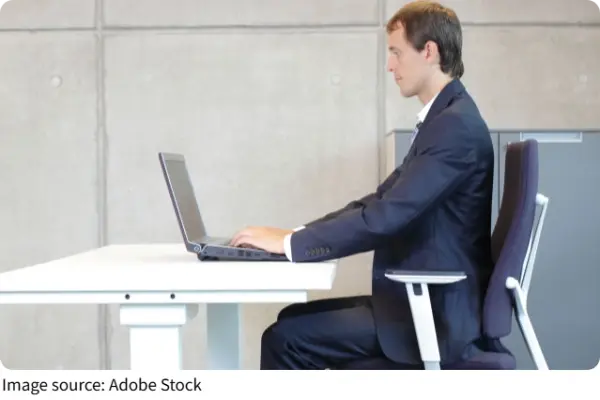
Effective desk ergonomics combines a suitable workstation with regular movement. A supportive chair, appropriately positioned screen, accessible keyboard and mouse, and stable foot support can create a more comfortable working environment.
The goal is not perfect posture but a sustainable routine that supports the body and allows regular changes in position throughout the working day.